| System / distinction | EAM | CMMS | CAFM | ERP with maintenance module |
|---|---|---|---|---|
| Area of application | Holistic asset management across the entire lifecycle | Day-to-day maintenance of machines and equipment | Management of building-related processes and infrastructure | Maintenance processes managed within an ERP system |
| Functional focus | Investment planning, risk management, strategic management | Asset management, issue reports, maintenance planning, work orders, spare parts, dashboards | Room, space, and key management; cleaning; required inspections; maintenance of building systems | Technical assets, work orders, feedback, cost integration, material postings |
| Asset lifecycle | From investment decision to decommissioning / disposal | From commissioning to feedback or decommissioning | From commissioning to feedback or decommissioning | Technical assets are managed in the ERP from creation onward, with a focus on business processes such as purchasing, inventory, and costs |
| Objective | Align asset use with strategic business goals | Ensure efficiency and availability in day-to-day operations | Manage and operate buildings | Integrate maintenance processes into existing ERP structures without changing systems |
Content
- Overview of providers and feature comparison
- CMMS, EAM, CAFM or ERP?
- Why implement maintenance software?
- Example scenario for standardizing and optimizing processes
- Who uses CMMS software?
- What features do a maintenance team need?
- Successful CMMS software implementation
- Six steps to technical implementation and integration
- How much does CMMS software cost and when does it pay off?
CMMS software comparison: Providers, features, and decision guide

Daniel Mirbach, Head of Marketing
| 18 Min. read
| 18 Min. read

Anyone preparing to implement CMMS software is faced with a wide range of solutions and software categories. Beyond distinguishing between categories, the key considerations are features, costs, integration capabilities, and one central question: What is the right fit for your maintenance organization?
This article provides a structured decision guide:
- a comparison table of nine leading providers from Germany, Austria, and Switzerland
- an overview of key features,
- background information on system types, and
- practical tips for successful change management and technical implementation.
Which CMMS software is right for you?
Choosing the right CMMS software involves considering core maintenance management features, cross-functional capabilities that support consistent master data and data and information flows, implementation effort, licensing and pricing models, and support options.
The table below focuses on providers headquartered in Germany, Austria, or Switzerland (the DACH region). It is intended as a starting point for your own evaluation and was compiled in good faith and with a commitment to fairness, based on publicly available information. To make an informed choice, you should always conduct your own tests, speak with providers, and run pilot phases.
The key is to identify the features you actually need and the software that best supports your processes.
| Evaluation / Provider | Maintastic | SAP PM | TOM | Hoppe Wartungsplaner | Remberg | isproNG | Timly | osapiens | IFS Ultimo |
|---|---|---|---|---|---|---|---|---|---|
| CATEGORY | CMMS | ERP / EAM with maintenance module | CMMS / CAFM | Maintenance / inspection scheduling software | CMMS | CMMS | Maintenance / inventory management software | CMMS / CAFM | EAM |
| HEADQUARTERS / LOCATION | 🇩🇪 DE | 🇩🇪 DE | 🇩🇪 DE | 🇩🇪 DE | 🇩🇪 DE | 🇦🇹 AT | 🇨🇭 CH | 🇩🇪 DE | 🇳🇱 NL / 🇩🇪 DE |
| CORE FEATURESN | |||||||||
| Asset management | |||||||||
| For reactive maintenance | |||||||||
| For preventive maintenance | |||||||||
| Work orders & tasks | |||||||||
| For autonomous maintenance | |||||||||
| For mobile maintenance | |||||||||
| For condition-based maintenance | |||||||||
| CROSS-FUNCTIONAL FEATURES | |||||||||
| Live collaboration with equipment manufacturers | |||||||||
| AI Assistants / AI Agents | |||||||||
| Spare parts management | |||||||||
| Digital checklists & inspection reports | |||||||||
| Dashboards & reporting | |||||||||
| Integration with third-party systems | ---- | ||||||||
| Customization | HIGH | HIGH | Not specified by provider | LOW | HIGH | MEDIUM | MEDIUM | LOW | |
| Deployment options | Cloud (EU, Germany, and worldwide), on-premises | S/4HANA Cloud-Modul, on-premises | No provider Information | No provider Information | Cloud (EU) | No provider Information | Cloud (EU) | Cloud (osapiens HUB) | Cloud (EU) |
| LICENSING MODELS | 2 plans | Upon request | Not specified by provider | One-time fees | 4 plans | Not specified by provider | 3 plans | 4 plans | 3 plans |
| IMPLEMENTATION EFFORT (depending on setup and licensing model) | LOW - MEDIUM |
HIGH | LOW - MEDIUM |
MEDIUM | LOW - MEDIUM |
No rating available because provider information is missing | No rating available because provider information is missing | LOW - MEDIUM |
LOW - MEDIUM |
| TRIAL ACCESS / PILOT | |||||||||
| SUPPORT | Phone and email support; German, English, and other languages | Usually provided by specialized consultants | Phone and email support; German | Phone and email support; German | German and English; DACH support | Phone and email support; German and English | By phone & by email, live chat | Support center, level 3 support | Phone and email support |
| TRAINING / ONBOARDING | Ramp-up and training packages | Usually provided by specialized consultants | Not specified by provider | Not specified by provider | Not specified by provider | Not specified by provider | Implementation and training as needed | Training Academy, live training / webinars | E-learning, customer portal |
| CERTIFICATIONS | |||||||||
As of October 2026
CMMS, EAM, CAFM, or ERP? Comparing the main system types
When researching CMMS software, you will quickly encounter terms such as CMMS, EAM, CAFM, and ERP software with maintenance modules. These labels refer to different system types, with areas of application that sometimes overlap and sometimes clearly differ.
CMMS – Computerized Maintenance Management System
CMMS stands for Computerized Maintenance Management System used to manage maintenance activities.
A CMMS is designed to support day-to-day maintenance operations for technical assets and machinery. It supports processes such as issue reporting, work order management, preventive maintenance plans, spare parts management, documentation, and mobile work orders.
EAM – Enterprise Asset Management
An Enterprise Asset Management (EAM) system covers the entire asset lifecycle, from procurement and operation to maintenance, retrofitting, risk management, and disposal. A CMMS, or its functionality, can be part of an EAM system.
CAFM – Computer Aided Facility Management
Unlike a CMMS, CAFM (Computer-Aided Facility Management) systems focus on building-related processes such as room and key management, cleaning, maintenance of building systems, and space analysis.
ERP – Enterprise Resource Planning with a maintenance module
Enterprise Resource Planning (ERP) systems manage business-wide processes such as purchasing and procurement, inventory, production, human resources, and finance in one integrated environment. Many of these systems also include modules for maintenance processes.
Choosing the right system is not easy. The decision should primarily be based on the specific needs of the maintenance organization. Depending on the organization, IT strategy, and site structure, integration with existing ERP or other enterprise systems may also be a factor.
Before shortlisting any of these systems, it is worth looking at the broader drivers behind the digitization of maintenance processes.
Why digitize maintenance processes? Benefits of digitization
Digitizing maintenance processes is an important way to operate technical assets more productively, reliably, and cost-effectively. Priorities vary by industry, company size, and level of maturity. Common drivers for adopting digital maintenance solutions include:
Reduce unplanned downtime
through structured issue reports and faster response times
Increase asset availability
through better-planned maintenance activities
Extend the service life of existing assets,
especially older machines and assets affected by investment backlogs
Use data for continuous improvement,
e.g., by analyzing failure causes, MTTR, or spare parts consumption
Reduce the workload on skilled staff
with mobile work orders, digital instructions, faster information retrieval, and less paperwork or spreadsheet work
Mitigate skills shortages
and preserve knowledge despite generational change
Reduce costs
through preventive maintenance, optimized resource use, and less downtime
Harmonize and scale maintenance
through standardized processes and solutions across the company
Example scenario: Standardizing and improving processes with CMMS software

A manufacturing company with 7,000 employees and several international sites plans to consolidate its maintenance processes. Each plant has its own local maintenance team. Every production site uses a mix of legacy systems and tools, some of them less than optimal and difficult to develop further as well as Excel-based workflows. The company wants to establish a standardized, digitally supported maintenance process that meets the following requirements:
- Centralized reporting and handling of issues
- Consistent work order processing with clear responsibilities
- Integration of spare parts management
- Involvement of external equipment manufacturers and service providers
- Transparent feedback and documentation
- Reports and KPIs for analysis and benchmarking
- Optional extension to include condition data (condition monitoring)
This is a common starting point for the search for the right software solution. It is important to understand internal requirements, user groups, and processes in detail. This provides the basis for analyzing future users.
Who uses CMMS software? Requirements by role
CMMS software delivers its full value only when it is aligned with the actual workflows and needs of the people involved. That is why it is important to define early on who will use the system and for what purpose. Requirements vary significantly by department, role, and area of responsibility. The following groups are typically involved.
| Maintenance teams |
|
|---|---|
| Technical leadership / maintenance management | |
| Production managers / equipment operators |
|
Even if many people use the software, they do not all need the same range of features. For example, an equipment operator may report issues or access specific instructions to carry out simple maintenance tasks as part of autonomous maintenance.
The functions required by each role should therefore be defined early, taking licenses, training, and total costs into account. A well-designed role model helps with realistic planning and avoids unnecessary complexity.
What features do a maintenance team need? The Maintastic CMMS as an example
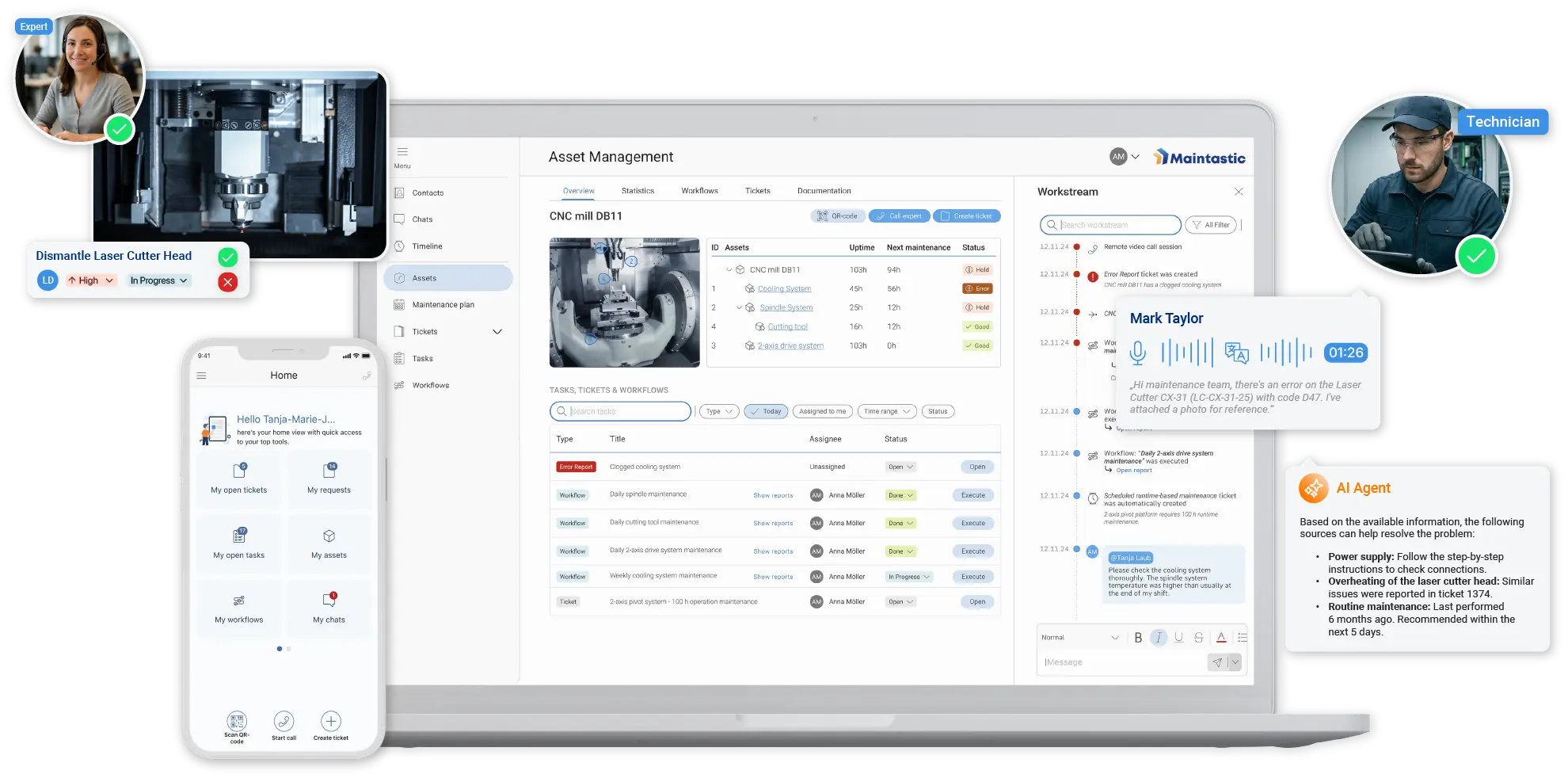
The Maintastic CMMS was developed specifically for maintenance management in manufacturing companies, with the goal of simplifying day-to-day workflows and managing them digitally. The software supports typical maintenance processes throughout the lifecycle of technical assets, from the initial issue report to the final work order feedback.
The following features have proven central to modern maintenance management in customer use.
Manage assets and equipment: Asset management
Manage technical assets such as machines, equipment, and components, including master data, serial numbers, and location information.
Link assets to maintenance plans, work orders, manuals, spare parts, and checklists, and build a repair and maintenance history.
BENEFIT: Less time spent searching, better planning, and improved traceability of maintenance activities
Reactive maintenance: Tickets and issue reports
Report issues using a smartphone and QR code.
Issues can be supplemented with videos and images, categorized, prioritized, and assigned.
Feedback is submitted through the CMMS app.
BENEFIT: Faster response times and lower MTTRMean Time to Repair
Preventive maintenance: Maintenance planning
Create recurring maintenance plans for machines and assets that require inspections or are critical.
Generate work orders and assign them to maintenance technicians.
BENEFIT: Higher asset availability and increased MTBFMean Time Between Failures
Work orders and maintenance overview
View all open, in-progress, and completed work orders, including status, deadlines, and feedback.
Filter and document work orders by site, production line, or machine group.
BENEFIT Clearer priorities and workflows in day-to-day maintenance
Autonomous maintenance: Digital checklists and instructions
Step-by-step instructions, inspection reports, or checklists can be embedded directly in a work order.
Ideal for simple, recurring tasks that equipment operators can perform.
BENEFIT: Reduce the risk of failures and shorten downtime
Mobile maintenance: CMMS app
Access key features on mobile devices, including reporting issues, completing work orders, recording feedback, checking off lists, attaching photos and videos, and viewing equipment history.
BENEFIT: Less walking, lower MTTAMean Time to Acknowledge und MTTR
Collaboration with equipment manufacturers
Collaborate with equipment manufacturers via live video and chat in the context of assets, issue reports, and work orders.
BENEFIT: Faster problem resolution and reduced downtime
Condition-based / predictive maintenance: Interfaces
Monitor conditions with IoT systems and automatically create tickets.
BENEFIT: Improved response to potential failures and lower MTTA and MTTR
Integration with ERP systems
Automated transfer of master data, work orders, and documentation.
Integrate functional locations and equipment structures from SAP via API.
BENEFIT: Consistent data and seamless processes
Funktionen mit AI-powered features
Capture issue reports by voice and translate them automatically when needed.
Find information more easily and get suggested solutions based on historical maintenance and operating data as well as technical documentation.
BENEFIT: Higher-quality issue reports and faster problem resolution
Customization
Configure the system flexibly with custom input forms and required fields for tickets and work orders.
Assign permissions and roles to internal and external users.
BENEFIT: Higher user adoption and clear responsibilities
Try Maintastic CMMS for free, with no obligation
Explore the key features for digital maintenance. Start your 14-day cloud-based trial with Maintastic today.
Successful CMMS software implementation: Change management, adoption, and employee involvement
Implementing CMMS software is not just an IT project. It is a change process that affects ways of working, roles, and responsibilities across the organization. Adoption is a key success factor, especially in maintenance, where many processes have evolved over time and daily operations are often under significant time pressure.
Even a powerful modern CMMS will not reach its potential if employees are not brought along, and implementation may fail. Often, one person – a change champion or “hero” – is needed to initiate the change and convince others. This makes it all the more important to support the project not only technically, but also organizationally and through clear communication.

Structuring change: Change management models as a guide
Successful software projects do not happen by chance. They often draw on established change models, such as Richard K. Streich’s seven phases of change or John P. Kotter’s eight-step model.
Richard K. Streich’s model describes typical emotional responses to organizational change. Streich identifies seven phases:
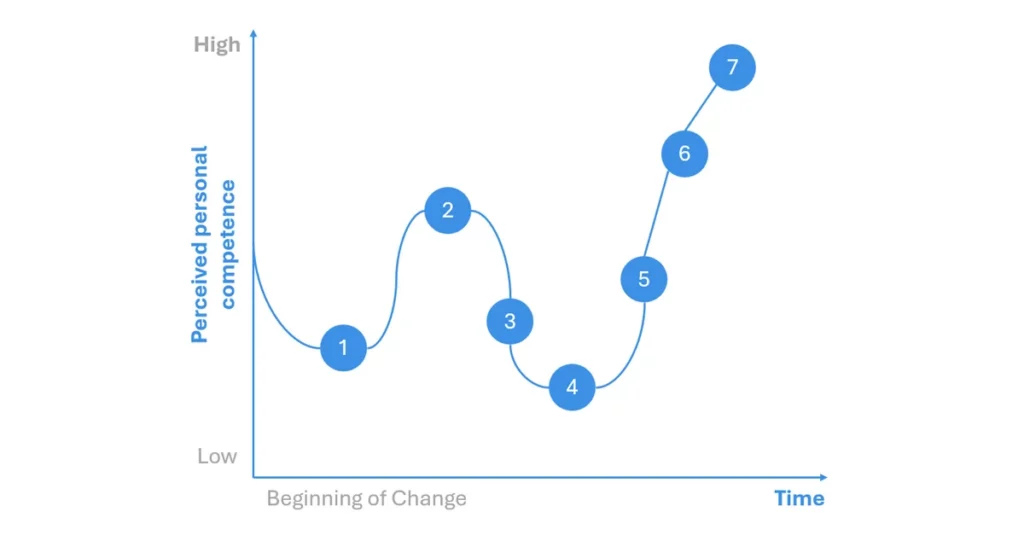
- Shock – surprise or confusion about the announced change
- Denial – rejecting or downplaying the change (“We don’t need this.”)
- Awareness – initial rational acceptance of the need for change
- Acceptance – emotionally embracing the change (“I can see how this helps me.”)
- Experimentation – first use of the new system and exploration of its features
- Realization – positive experiences reinforce the new way of working
- Integration – the change becomes part of everyday work
The model helps project teams stay aware of the emotional dynamics and respond with targeted communication, training, or pilot phases.
While Streich focuses on individual reactions, John P. Kotter focuses on managing organizational change in eight steps:
Step 1
Create a sense of urgency
Why is now the right time to improve processes?
Step 2
Build a guiding coalition
Who will drive the project and convince others?
Step 3
Develop a vision and strategy
What goals should the software help achieve?
Step 4
Communicate the vision
Frühzeitig, transparent und wiederholt
Step 5
Enable employees to act
Remove barriers, provide training, and gather feedback
Step 6
Generate short-term wins
Pilot areas and initial KPIs
Step 7
Anchor the change
Define processes, roles, and responsibilities
Step 8
Continuously improve
Incorporate feedback and develop the system iteratively
Involving employees from the start
To encourage adoption from the outset, involve all relevant people early. Useful approaches include:
- Stakeholder workshops: develop requirements together and define roles
- Interviews and surveys: understand needs and challenges from a practical perspective
- RACI model: clarify responsibilities (Responsible, Accountable, Consulted, Informed)
- Communication plan: who communicates what, when, and how?
Checklist: Structuring employee involvement
| Action area | Question | Objective |
|---|---|---|
| Identify stakeholders | Who is directly or indirectly involved in implementing the software? | Keep all relevant groups in view |
| Identify needs | What problems, needs, and workflows exist today? | Derive requirements from practical experience |
| Define user personas | Which roles use the system, and how frequently? | Plan use cases and access permissions |
| Set up communications | How will employees be informed, engaged, and convinced? | Create transparency and involvement |
| Ensure early involvement | How can early adopters help shape the system? | Increase adoption and user engagement |
| Clarify roles and responsibilities | Who is responsible for what in the project? (RACI) | Who is responsible for what in the project? (RACI) |
| Prepare training | Which content and formats make sense? | Ensure relevance and practical application |
| Build in feedback loops | Where and how can feedback be incorporated into the project? | Enable continuous improvement |
| Make successes visible | Which positive effects can be communicated early? | Strengthen internal motivation |
Technical implementation and integration in 6 steps: Making CMMS software part of your system landscape
After selecting the software and preparing the organization, the next phase is technical implementation and integration into the existing IT and process landscape. The following six steps outline one way to approach implementation and the challenges to address.
1. System access & user management
• Set up user roles and permission groups
• Integrate with existing authentication systems (SSO, Active Directory)
↓
2. Master data import & system setup
• Import technical assets, machine lists, and spare parts data
• Prepare data from Excel, legacy systems, or ERP systems
↓
3. Interfaces & integration
• Integrate with ERP systems for master data, work order data, and completion reports (e.g., SAP PM)
• Enable event-based communication with IoT systems
↓
4. Configure processes
• Map notification, approval, and completion workflows
• Configure custom fields, forms, and required fields
↓
5. Testing & pilot operation
• Test the system with selected machines and user groups
• Gather feedback and make adjustments
↓
6. Go-live & operations
• Roll out the system to additional departments or sites
• Provide support, monitor system performance, and make regular improvements
How much does CMMS software cost and when does it pay off?
When comparing providers, do not consider only monthly license fees. The key is to look at the total cost of ownership (TCO), which includes all one-time and recurring costs associated with using the system.
Typical cost factors include
- Software licenses: based on the number of users, roles, modules, or feature packages
- Setup and implementation: configuration, user setup, and data migration
- Training and onboarding: training for maintenance, production, and management
- Integration with other systems: e.g., ERP, IoT platforms, and single sign-on
- Support and updates: included in maintenance contracts or offered as an option, depending on the provider
- Hardware: potentially new tablets or smartphones if bring your own device (BYOD) is not permitted
- Internal project effort: time and resources for project management, testing, and rollout
Implementing CMMS software requires time and money, but the benefits often outweigh the investment. Depending on the starting point, company size, and objectives, a positive return on investment (ROI) may be achieved within 6 to 18 months.
Quantitative effects can be demonstrated using metrics such as MTTR and OEE, or by measuring reduced downtime. More efficient use of personnel and spare parts also contributes to cost-effectiveness.
Qualitative benefits are also becoming increasingly important. These include preserving technical knowledge through digital documentation and AI-supported retrieval (e.g., through a chatbot), reducing the workload on skilled staff with mobile work orders, improving response times (MTTA), improving coordination between production, maintenance, and external partners or suppliers, and enabling scalable, standardized processes across multiple sites.
FAQ: Frequently asked questions about selecting and implementing CMMS software
Which type of system is best for our company?
That depends largely on the intended use:
- CMMS for operational maintenance in industry and manufacturing
- EAM for strategic asset management across the entire lifecycle
- CAFM for building-related maintenance, room management, and space management
- ERP with a maintenance module when maintenance processes need to be managed within an ERP system
How long does it typically take to implement CMMS software?
The timeline varies depending on the provider, complexity, and project scope. A cloud-based CMMS such as Maintastic can be implemented quickly. A successful pilot typically lasts between 3 and 6 months.
What hidden costs can arise when scaling CMMS software?
A common cost driver when scaling is the licensing cost for CMMS software users. License costs for occasional users are often underestimated, especially when adding sites and departments. These may include production employees who only need to report issues.
Maintastic offers so-called Light User licenses for these scenarios, supporting limited use cases in a cost-effective way.
What questions should you ask when evaluating CMMS software?
- Does the software fit our maintenance processes and system landscape?
- How flexible is the system in terms of user roles and customization?
- How does it integrate with existing systems (ERP, IoT)?
- Are trial access or pilot options available?
- How do costs scale as our needs grow?
How important is ease of use in CMMS software?
A good user experience is essential for adoption. Intuitive operation, clear navigation, and mobile access make it easier to get started and encourage daily use. Even software with strong features will struggle to gain traction if it is complex and difficult to use.
What are common pitfalls when implementing CMMS software?
Common challenges include unclear requirements, low employee adoption, an overly technical focus without regard to processes, missing interfaces, and unexpected costs. Structured change management helps avoid these pitfalls.
Start your CMMS software comparison
Contact us to learn how we can support your maintenance team. During a personal software tour, we will show you how Maintastic fits your requirements. Or start right away with a free 14-day trial.