

Maintenance planning software as the foundation of modern maintenance operations
As a core component of preventive maintenance programs, maintenance planning plays a critical role in modern maintenance operations. Maintenance planning software provides the foundation for a structured, digital overview of when assets and equipment require servicing, helping teams schedule recurring maintenance activities and reduce the impact of normal wear and tear. Maintastic’s maintenance management software gives maintenance managers a centralized CMMS planner for organizing maintenance schedules, coordinating work orders, and improving equipment reliability across the shop floor.
- Individual, not rigid – maintenance plans adapt to your operational processes, not the other way around
- Connected, not isolated – manage planning, work orders, and complete maintenance history within a single system
- Mobile, not paper-based – technicians complete maintenance tasks directly on the shop floor using the CMMS mobile app
Create and manage flexible maintenance schedules with maintenance planning software
Create maintenance schedules for your equipment and assets that align with your operational requirements and streamline maintenance planning across your facility. Whether you need daily, weekly, monthly, or annual maintenance activities, one-time service tasks, or recurring inspections, Maintastic’s maintenance planning software allows you to schedule and manage all maintenance work based on custom time intervals. If you manually adjust the interval – for example, by a few days – this change is also factored into future maintenance dates via Completion-Based Scheduling. Define priorities, estimated task durations, and scheduling requirements while using flexible templates that can be tailored to your maintenance processes and operational workflows.
And you stay in full control of your maintenance planning.
Overview of all scheduled tasks
Traffic light system for quick status check
Advanced filter and search functions
Hear directly from Maintastic users
Companies using Maintastic fix problems twice as fast, find information quicker, and get 25% more out of their maintenance operations.
Assign work orders and ensure safe execution
Automatically assign planned maintenance, repair tasks, or inspections to your technicians as work orders directly from the maintenance planning software. Each work order can include digital work instructions, interactive checklists, inspection records and forms that guide maintenance teams through standardized procedures and help ensure consistent execution.
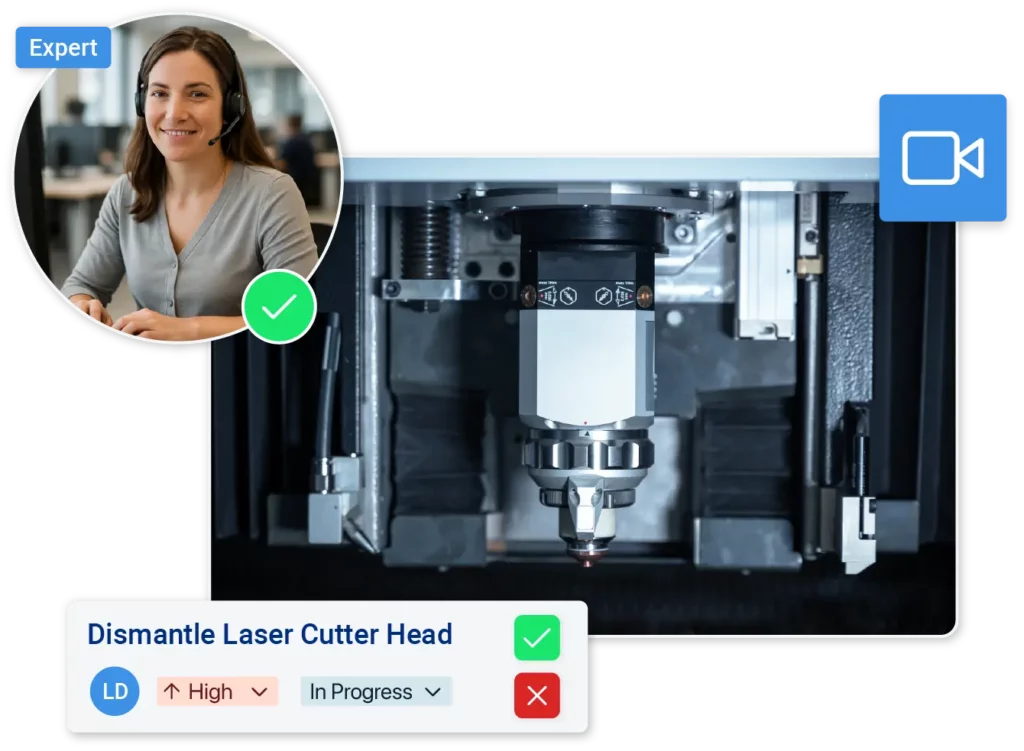
When technical questions arise or coordination is required, Maintastic brings all parties together. Colleagues and external technicians from equipment suppliers can collaborate using integrated video calls, chat, and comments – directly within the work order.
Complete work orders on the go with the Maintastic mobile app
Work orders are available not only in the desktop version of the maintenance management software but also in the Maintastic mobile app. This allows technicians to review, execute, and complete maintenance tasks directly on the shop floor without unnecessary trips between the office and the asset.
Using the mobile app, technicians can:
Using the mobile app, technicians can:
- Document maintenance activities, findings, and updates directly within the work order.
- Create additional tickets for the affected asset through the integrated ticketing system.
- Report issues by voice with Voice-to-Ticket technology - the AI agent automatically converts spoken input into structured maintenance tickets for faster and more efficient reporting.


Optimize maintenance plans with maintenance planning software
With Maintastic’s maintenance planning software, you can continuously improve and refine your maintenance schedules. By comparing scheduled and actual task durations, you can identify opportunities for greater efficiency and more accurate planning. If a single maintenance task needs to be rescheduled, you can adjust it individually without disrupting the entire maintenance schedule. This gives maintenance managers greater control over resource allocation, technician workloads, and ongoing maintenance planning.
Adjust roles and responsibilities within maintenance schedules
Improve maintenance coordination by defining who will perform maintenance tasks and who will oversee them directly when creating a maintenance schedule. Assign technicians specific roles and responsibilities alongside their work orders to ensure maintenance activities are completed efficiently and with clear accountability. If requirements change, there is no need to delete and recreate existing schedules. Simply update the maintenance plan within the maintenance planning software and reassign roles and responsibilities as needed.


Track the history of every machine in one software
Maintastic’s maintenance planning software records and stores all maintenance activities, repairs, and inspections, creating a complete, traceable service history for every machine and system. This includes performed actions, assigned technicians, and completed work instructions and checklists. Even if a maintenance plan is deleted, only future scheduled work orders are removed. Previously completed maintenance activities remain stored in the system, creating a reliable historical record and a valuable data foundation for asset management.
Discover Maintastic CMMS for modern maintenance management
AI agent
Advanced AI technology supports your team by converting spoken issue reports into structured digital tickets. With Voice-to-Ticket capabilities, maintenance teams can capture information faster, improve data quality, and ensure maintenance and repair activities are documented consistently from the start.
Asset management
Easily manage all your machines, equipment, and facility systems in one place – with clear access to asset structures, maintenance history, and more.
Ticketing & error management
Easily report issues on-site – by scanning a QR code at the machine or automatically through IoT integration.
Mobile CMMS
The Maintastic CMMS puts maintenance at your fingertips – manage tickets and work orders right from the shop floor.
Live collaboration
Quickly connect technicians and experts through video and chat to resolve technical issues – no delays, no downtime.
FAQ – Frequently asked questions about Maintastic’s maintenance planning software
What is Maintastic maintenance planning software?
The maintenance planning feature is part of the Maintastic CMMS. It enables you to efficiently create and optimize maintenance schedules for machinery, equipment, and other assets.
What maintenance scheduling options are available?
You can schedule both recurring maintenance (daily, weekly, monthly, yearly) and one-time tasks.
Can I compare planned times with actual work durations?
Yes, the maintenance planning software lets you record and compare planned and actual work times – helping you analyze performance and continuously improve your processes.
How is maintenance activity documentation handled in Maintastic?
All maintenance, repair, and inspection activities are thoroughly documented and stored in the digital machine history –, along with assigned personnel, completed tasks, and related work instructions and checklists.
Ready for digital maintenance planning?
Start today with Maintastic maintenance planning and experience the full benefits of a digital maintenance strategy.